
How to Upgrade
Upgrading your property size and number of floors in TSO has many advantages, the major advantage being more building space. In order to upgrade a property, you must be the property owner and have enough simoleons to pay for the upgrade. The number of roommates you have on your property greatly affects the cost of the upgrade. The property upgrade calculator below will allow you to view these costs.
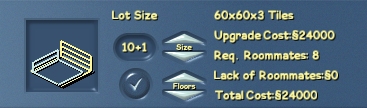
To upgrade your property, enter the property mode (F4) and click Lot Size Management. Here you can increase the size of your lot and the number of floors by clicking the up arrows. As you increase the lot size and number of floors, you will see the cost of the upgrade, the penalty cost if you do not have the required number of roommates, and the total cost. Once you have found the size you would like to upgrade to, click the checkmark button and your lot will be upgraded. Keep in mind that upgrading cannot be undone, so be sure you want to spend the money before you upgrade.
The number of roommates required to upgrade without penalty is one roommate for every level upgraded (size and floors combined) up to a maximum of 8 levels. After you upgrade 8 levels, there is no lack of roommates penalty. For example, if you upgrade your lot size from 1 to 2, and number of floors from 2 to 4, your total number of levels you are upgrading by is 3, so you would require 3 roommates to avoid the penalty.
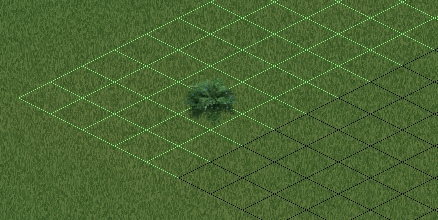
As you increase the size of your lot, you can preview the new size relative to the current size by zooming out and looking at the edges of your lot. The new space will be highlighted green.
It is also worth noting you can increase the lot size and number of floors indepentently of each other, meaning you can have a size 1 lot with 5 floors, or a size 11 lot with only 2 floors. The cost of increasing the lot size one level, and adding an additional floor are the same.
| Lot Size | Area |
| 1 | 12×12 |
| 2 | 20×20 |
| 3 | 26×26 |
| 4 | 31×31 |
| 5 | 35×35 |
| 6 | 39×39 |
| 7 | 43×43 |
| 8 | 46×46 |
| 9 | 55×55 |
| 10 | 60×60 |
| 11 | 64×64 |
| Floor Size | Number of Floors |
| 0 | 2 |
| 1 | 3 |
| 3 | 4 |
| 3 | 5 |
Object Limit
Each property has a limited number of objects that can be placed on it, and this limit is affected by the lot size, number of floors, and number of roommates. The limit is shared among all roommates, and all objects from buy and build modes (excluding walls and floors) are counted towards it.
Note: In newso residential properties have a looser object limit of a default 2000 allowing you to build solo.
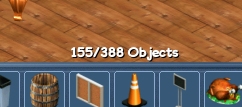
Each lot size + floors has a base object limit associated with it. When you add roommates, the base object limit is multiplied by the total number of roommates. For example, the base object limit for a size 1 lot with 2 floors is 75. If you add two roommates, the base object limit is multiplied by 3 for a total of 225 objects. In case you are wondering, a fully upgraded lot with the maximum number of roommates has an object limit of 2,400. Use the upgrade calculator below to see what your object limit can be when you upgrade your property.